

 login
loginОставьте свои данные
и мы вам перезвоним:



How to Register for YAELNET
YAELNET, the computerized Hebrew proficiency test, is offered on multiple dates throughout the year at NITE test centers. You register for it yourself on the NITE website, and the registration form is in Hebrew only. This guide takes you through it section by section, with every field translated and marked on screenshots.

Key points
- – You can take YAELNET throughout the year at the NITE test centers in Haifa, Tel Aviv, Jerusalem and Be’er Sheva. The dates and centers with available seats are shown when you register.
- – The fee is 300 ₪, payable by Visa, Mastercard, Isracard or American Express.
- – Register at least two business days before your test. You choose the day; NITE sets the time.
- – You must wait at least 35 days between Hebrew proficiency tests, including between YAEL and YAELNET.
- – Your score appears in your personal area on the NITE website within 10 days. It is not sent by email.
YAELNET and YAEL
YAELNET is taken on a computer, while YAEL is a paper-and-pencil test. Both use the same question types: sentence completion, restatements, reading comprehension and an essay. The format differs slightly, though. YAEL has three multiple-choice sections, but only two of them count toward the score; YAELNET has two, and the essay section allows 20 minutes instead of 15. Both are scored on a 50 to 150 scale, with the essay counting for one third of the total.
If you take the Psychometric Entrance Test in a language other than Hebrew, you are registered for YAEL automatically and take it right after the psychometric test. YAEL is not offered on its own, so if you want to take the Hebrew proficiency test separately, YAELNET is the way to do it.
YAELNET is also given from time to time at universities and colleges. For those sessions, you register through the institution, not through the form described here.
Before you start
- – Your Israeli ID (teudat zehut) or Israeli passport. If you have none of these, you can register with a foreign passport (see Step 3).
- – An email address you check regularly and a mobile phone number. Your registration confirmation will be sent by email.
- – A credit card for payment.
Step 1. Open the registration form
Go to the YAELNET page on the NITE website and click “click here” in the grey box.
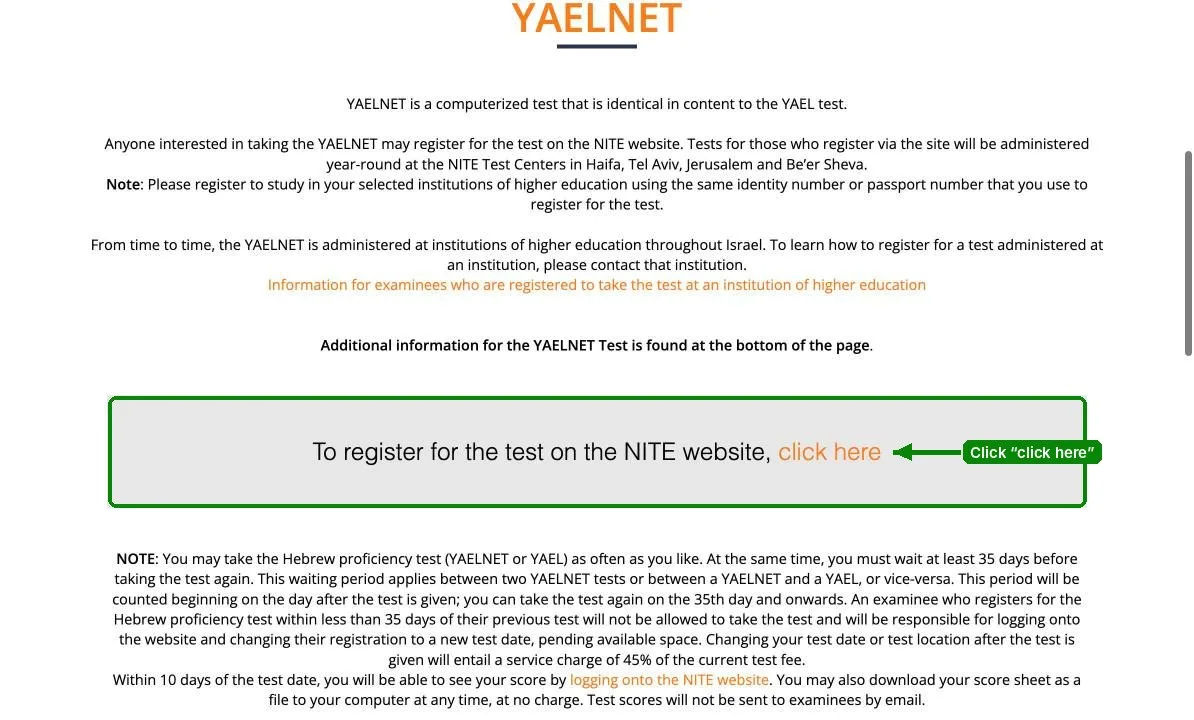
The form “הרשמה לבחינת יעלנט - עברית” opens. It has four sections, listed in the menu on the right, and you can fill them in any order.
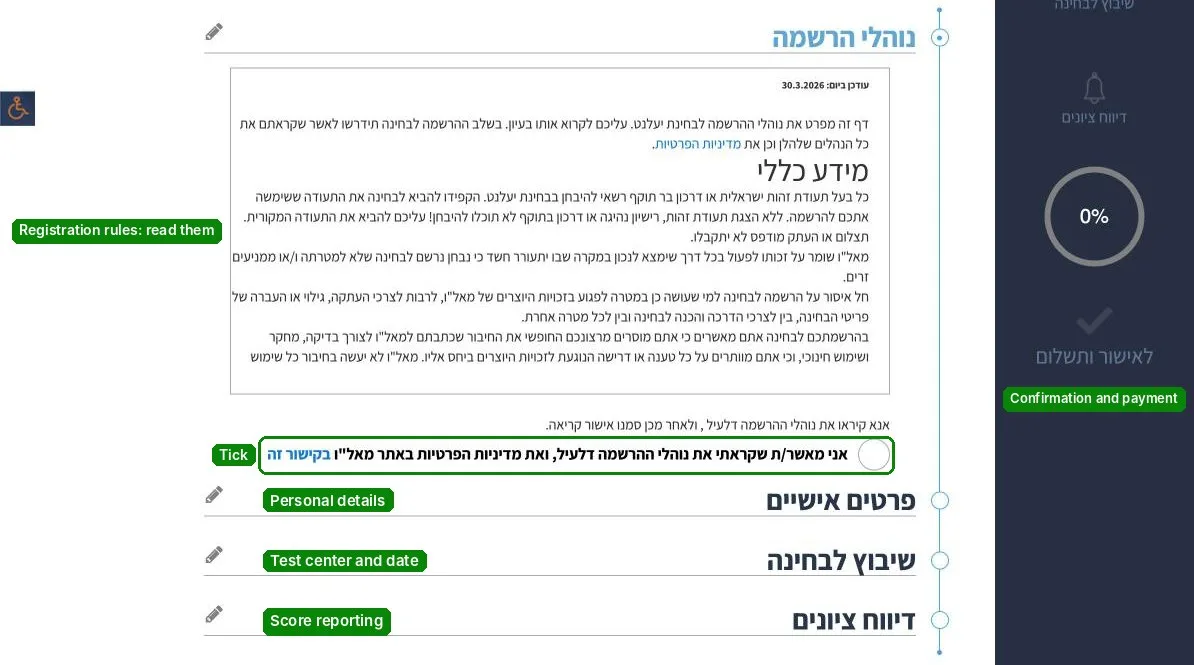
Step 2. Registration rules (נוהלי הרשמה)
Read the rules and tick the circle below them. This confirms that you have read the registration rules and the NITE privacy policy. You can’t pay without it.
Step 3. Personal details (פרטים אישיים)
Fields marked with an asterisk are required. Gender, street, ZIP code and the landline number are optional.
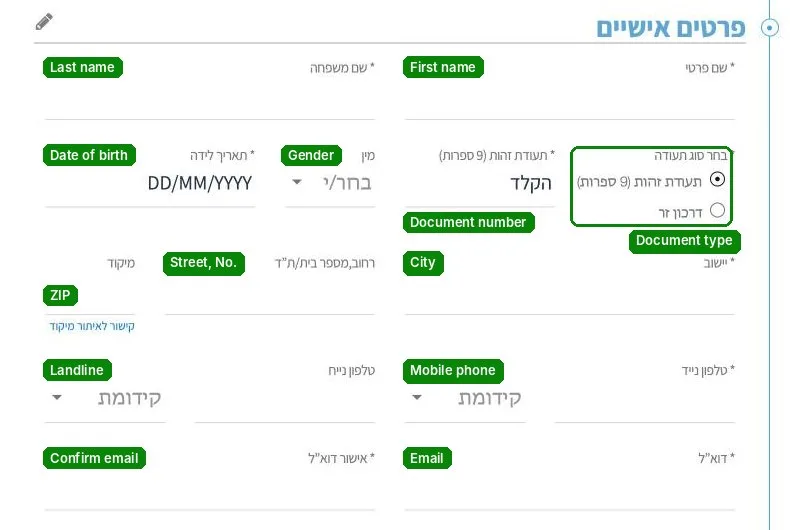
- – Document type: “תעודת זהות” (Israeli ID, 9 digits) or “דרכון זר” (foreign passport).
- – For your phone number, choose the prefix (קידומת) first, then type the rest of the number.
- – Enter your email twice and double-check it: your confirmation goes there.
If you don’t have a teudat zehut
- – If you have an Israeli passport, select “תעודת זהות” and enter the ID number shown in that document, not the passport number.
- – If you have no Israeli document at all, select “דרכון זר” and enter the last eight digits of your foreign passport number. If it has fewer than eight digits, add zeros on the left.
- – When you apply to a university or college, use the same number you registered for the test with.
Step 4. Test center and date (שיבוץ לבחינה)
- – Under “מרכז בחינה”, choose a test center: Be’er Sheva, Haifa, Jerusalem, or one of two temporary centers for the Tel Aviv area, at the MOFET Institute in Tel Aviv or at the Academic Center for Law and Business in Ramat Gan.
- – While “ללא הגבלה” (no restriction) is selected, the calendar shows available dates at all centers, but you still have to choose a center to register.
- – Dates with available seats are marked in green. Once you pick one, the center, date, time and fee appear below the calendar.
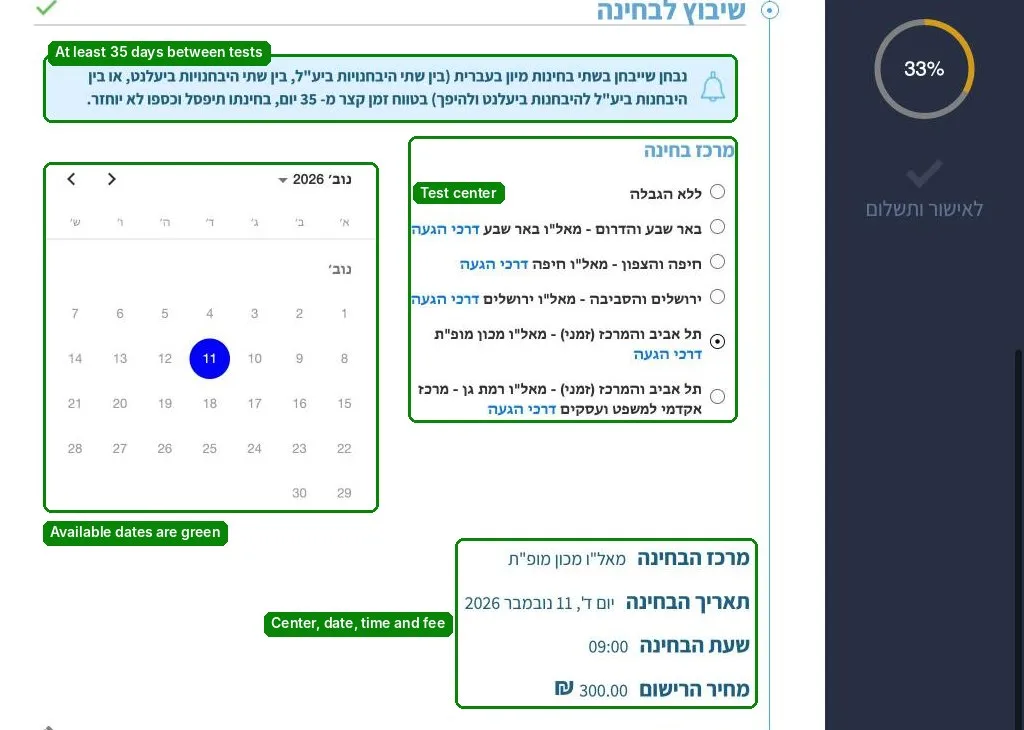
The blue box above the calendar is a reminder of the 35-day rule. If you take two Hebrew proficiency tests less than 35 days apart, the later test is disqualified and the fee is not refunded. The count starts the day after your previous Hebrew proficiency test (YAEL or YAELNET), so you can test again from day 35. If you register earlier, you will not be allowed to take the test and will have to move your registration to another date in your personal area.
Step 5. Score reporting (דיווח ציונים)
By default, your score goes to eight universities: Ben-Gurion, Bar-Ilan, Haifa, the Technion, the Hebrew University, Tel Aviv, Ariel and the Open University.
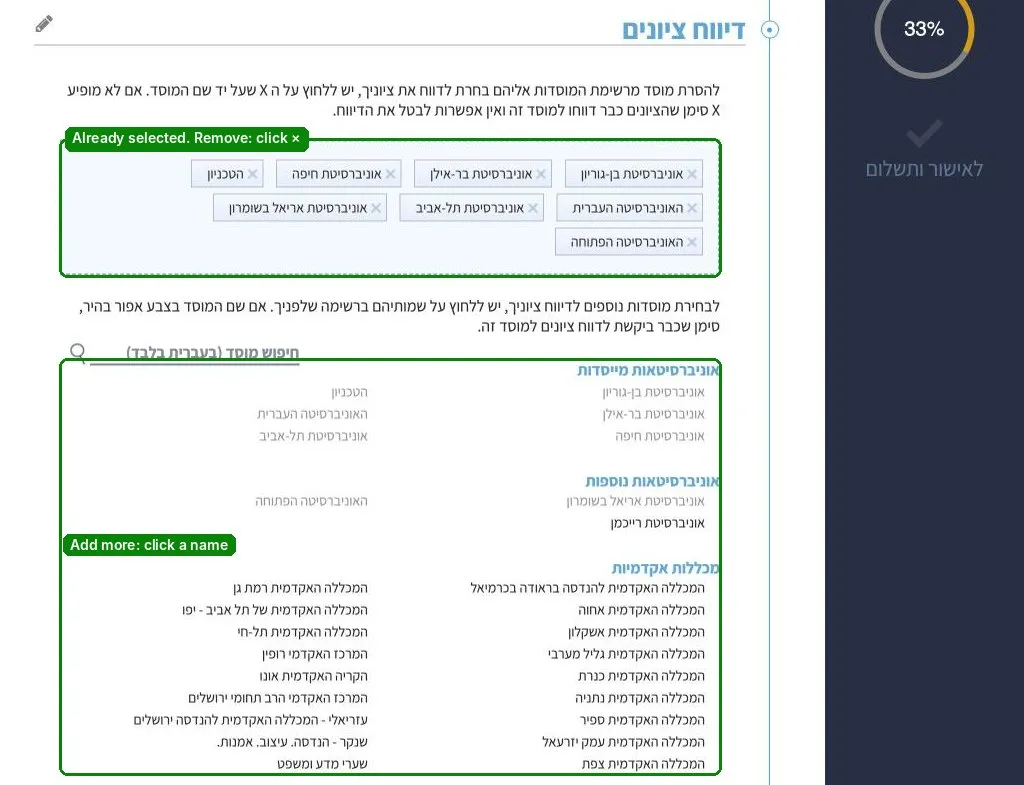
- – To add an institution, for example Reichman University or a college, click its name in the list below. The search box works in Hebrew only.
- – To remove one, click the × next to its name.
We recommend adding every college you plan to apply to right away.
Step 6. Confirmation and payment (לאישור ותשלום)
Click “לאישור ותשלום” at the bottom of the menu on the right. If a section is incomplete, a red “!” appears next to it. Go back and fill in what is missing.
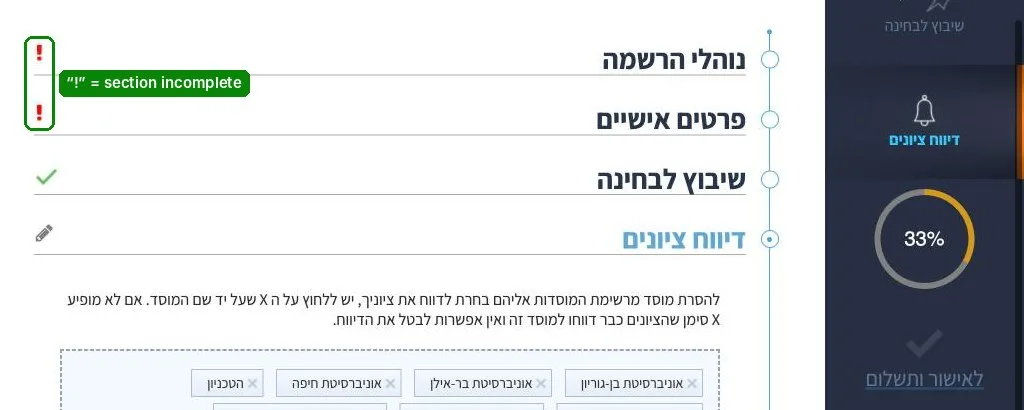
Then review the summary and pay by card. You will receive a confirmation by email. Your registration only counts once the system has recorded it, so don’t leave it to the last minute.
After you register
- – Check your confirmation right away: name, ID or passport number, test date and test center. If anything is wrong, correct it in your personal area or call the NITE Registration Center.
- – You can change your test date or center in your personal area free of charge up to two business days before the test. After that, the system is closed to changes until the day after the test.
- – If you miss the test, arrive late or come without valid ID, you can move your registration to another date in your personal area, subject to availability. Any change after the test day costs about 45% of the test fee (currently 135 ₪).
- – You can cancel in your personal area at any time except from two business days before the test until the day after it. Cancel within 48 hours of registering and you get a full refund; after that, a handling fee of about 5% applies within the first 14 days and about 30% after. Cancelling after the test day costs about 45%.
- – Your score is reported to institutions within 10 business days. It appears in your personal area within 10 days of the test, and you can download your score sheet there free of charge at any time.
- – The score is valid for at least seven years. Institutions usually consider your highest score, but check with the one you are applying to.
What to bring on test day
The original document you registered with. Without an Israeli ID card, driver’s license or valid passport, you will not be allowed to take the test. Photos and photocopies are not accepted. Phones, smartwatches, calculators, dictionaries and any other aids are not allowed in the test room.
This guide is based on the NITE registration procedures for YAELNET. Fees and procedures change from time to time, so check the amount in the system before you pay.
Want to prepare for YAELNET? Join us at OK!